> For the complete documentation index, see [llms.txt](https://docs.duplicati.com/llms.txt). Markdown versions of documentation pages are available by appending `.md` to page URLs; this page is available as [Markdown](https://docs.duplicati.com/monitoring-and-notifications/sending-reports-via-email/sending-telegram-notifications.md).
# Sending Telegram notifications
Describes the how to configure sending notifications via Telegram
To send a notification via Telegram you need to supply a channel id, a bot token and a an api key.
To obtain the bot token (aka bot id), message the `@BotFather` bot. After creating the bot, send a message to the bot, so it can reply. For more details on Telegram bots, see the [Telegram bot documentation](https://core.telegram.org/bots).
After obtaining the bot token you can obtain the channel id with a cURL script:
```
BOT_TOKEN="YOURBOTTOKEN" curl -s "https://api.telegram.org/bot$BOT_TOKEN/getUpdates" \
| grep -o '"id":[0-9]*' | head -1 | cut -d':' -f2
```
To obtain the API key, follow the [Telegram guide to creating an application](https://core.telegram.org/api/obtaining_api_id).
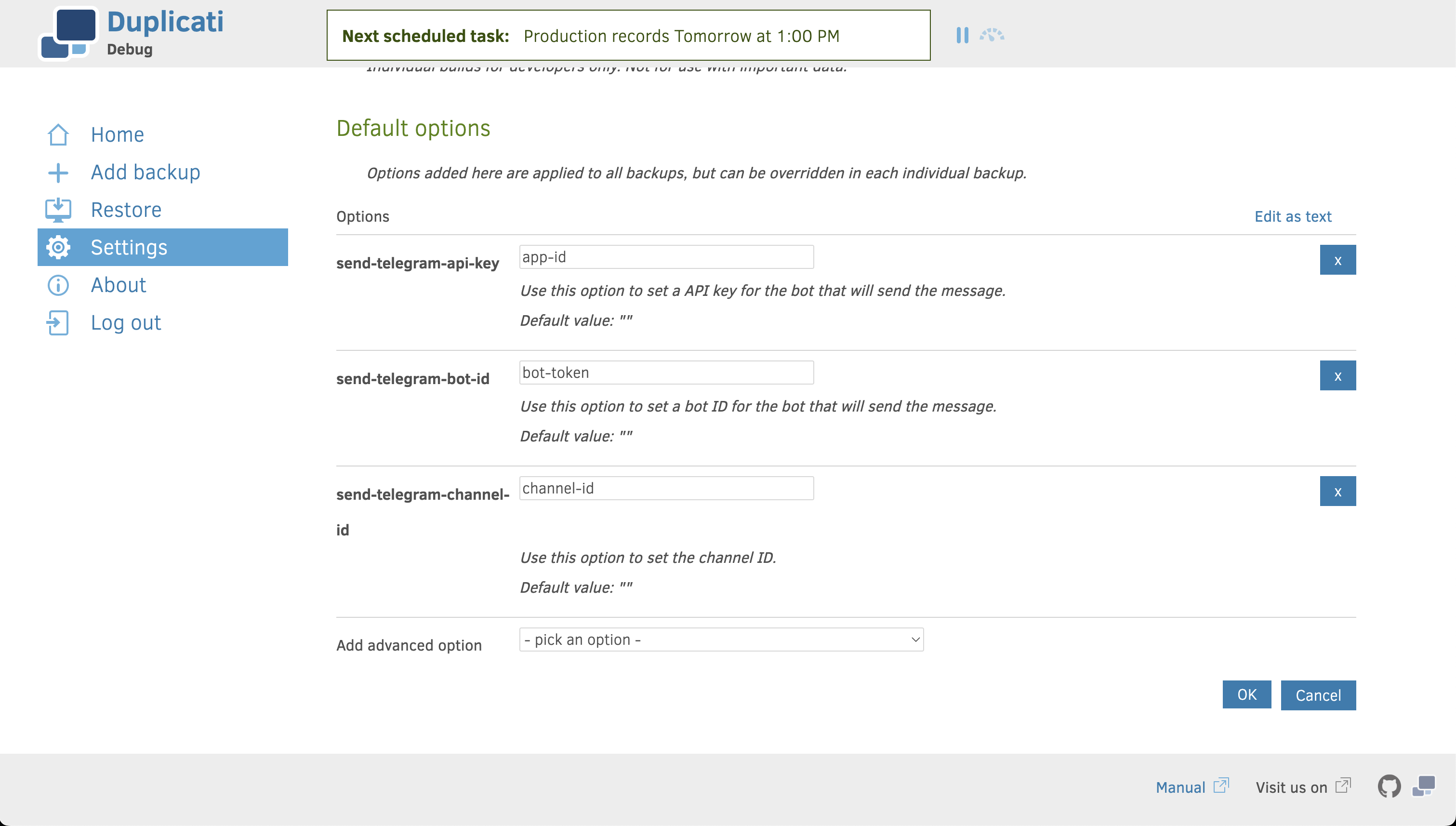
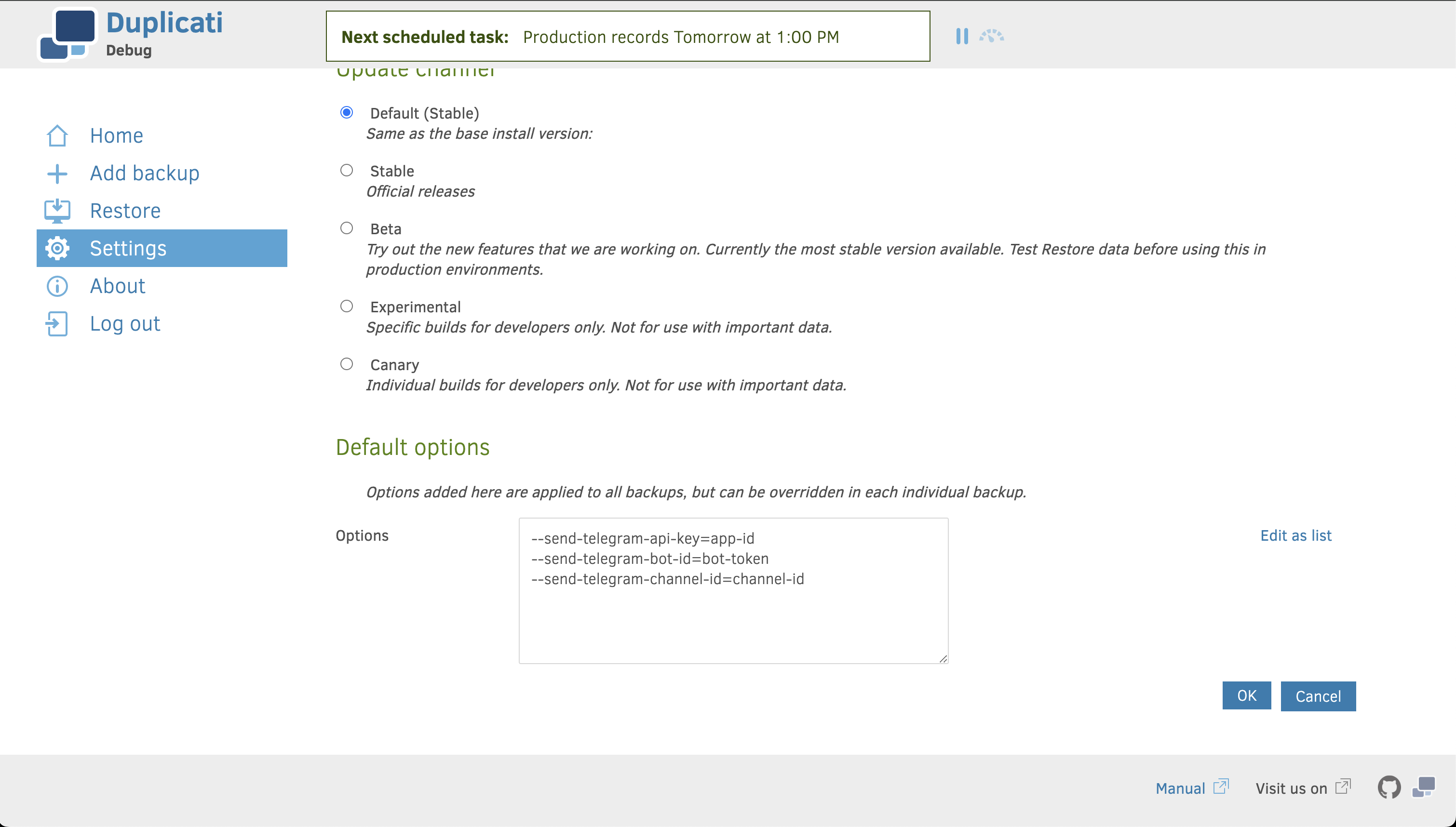
With all required values obtained, you can set up the Telegram notifications in the general settings:
Set up Telegram notifications with the default options editor
Set up Telegram option with a text field
You can toggle between the two views using the "Edit contents as text" and "Show editor" buttons.
Besides the mandatory options, it is also possible to configure:
* The notification message and format
* Conditions on when to send emails
* Conditions on what log elements to include
### Telegram Notification Options
**Bot Configuration**
**`--send-telegram-bot-id`**` `` ``(String) ` - The Telegram bot ID that will send messages
**`--send-telegram-api-key`**` `` ``(String) ` - The API key for authenticating your Telegram bot
**Message Destination**
**`--send-telegram-channel-id`**` `` ``(String) ` - The channel ID where messages will be sent
**`--send-telegram-topid-id`**` `` ``(String) ` - Topic ID for posting in specific topics within Telegram groups
**Notification Content**
**`--send-telegram-message`**` `` ``(String) ` - Template for message content with support for variables like %OPERATIONNAME%, %REMOTEURL%, %LOCALPATH%, and %PARSEDRESULT%
**`--send-telegram-result-output-format`**` `` ``(format) ` - Format for presenting operation results
* Duplicati
* Json
**Notification Filtering**
**`--send-telegram-level`**` `` ``(level) ` - Controls which result types trigger notifications:
* Success - Only successful operations
* Warning - Operations that completed with warnings
* Error - Operations that failed with recoverable errors
* Fatal - Operations that failed with critical errors
* All - All operation results regardless of status
**`--send-telegram-any-operation`**` `` ``(Boolean) ` - When enabled, sends notifications for all operations, not just backups
**`--send-telegram-log-level`**` `` ``(Enumeration) ` - Sets minimum severity level for included log entries:
* ExplicitOnly - Show only explicitly requested messages
* Profiling - Include performance measurement data
* Verbose - Include detailed diagnostic information
* Retry - Include information about retry attempts
* Information - Include general status messages
* DryRun - Include simulation mode outputs
* Warning - Include potential issues that didn't prevent completion
* Error - Include critical failures that require attention
**`--send-telegram-log-filter`**` `` ``(String) ` - Filters log entries based on specified patterns
**`--send-telegram-max-log-lines`**` `` ``(Integer) ` - Limits the number of log lines included in notifications
For details on how to customize the notification message, see the [section on customizing message content](/monitoring-and-notifications/sending-reports-via-email/custom-message-content.md).
---
# Agent Instructions
This documentation is published with GitBook. GitBook is the documentation platform designed so that both humans and AI agents can read, navigate, and reason over technical content effectively. Learn more at gitbook.com.
## Querying This Documentation
If you need additional information that is not directly available in this page, you can query the documentation by asking a question.
Perform an HTTP GET request on the following URL with the `ask` and `goal` query parameters:
```
GET https://docs.duplicati.com/monitoring-and-notifications/sending-reports-via-email/sending-telegram-notifications.md?ask=&goal=
```
`ask` is the immediate question: it should be specific, self-contained, and written in natural language.
`goal` is what the user is ultimately trying to achieve, the reason they need the answer. Sharing it helps GitBook give you a better, more relevant answer. A goal is most helpful when it describes the outcome the user wants rather than restating the question. For example, with `ask=how do I create an API token`, a goal like `automate deployments from our CI pipeline` lets GitBook tailor the answer to that use case.
The response will contain a direct answer to the question and relevant excerpts and sources from the documentation.
Use this mechanism when the answer is not explicitly present in the current page, you need clarification or additional context, or you want to retrieve related documentation sections.